|
|

|

|
|
|
|
Mailing List
|
|
Subscribe to Miha's utilities Google group and receive an e-mail when the programs
are updated and new versions are released (in English).
|
|
|
|
Contact me
|
|
freeware@mihov.com
|
|
|
|
Translation
|
Page translated by: Miha Psenica
Program description translated by: Miha Psenica
Program translated by: Miha Psenica
Please translate this page to your language! >>
|
|
| |
Quick facts
|
|
| |
|
 |
Version: 1.2
Date: 4.1.2009
Size: 363 kB
Category: Graphics, Image utilities, Batch picture processing, Automation
Screen Shot
Licence: Free
|
|
|
| |
Description |
|
| |
|
|
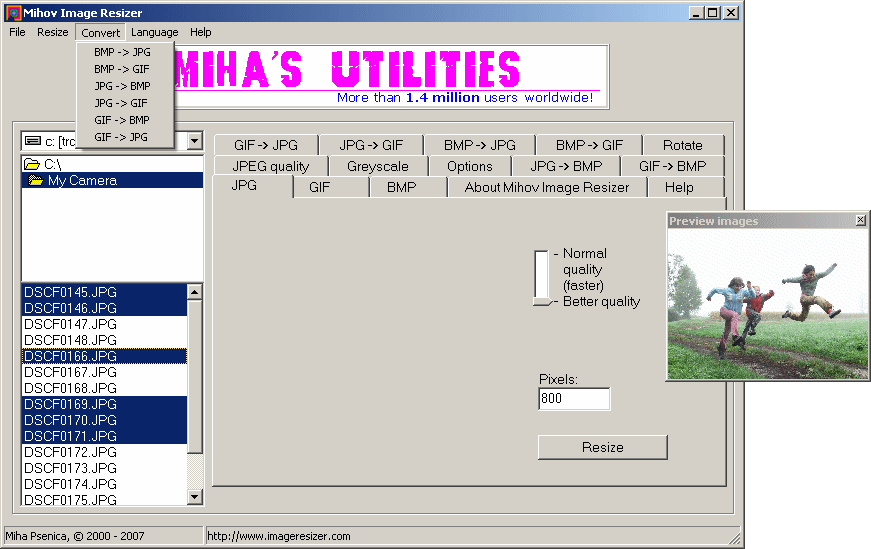
Mihov Image Resizer is a handy and useful Windows program for batch resizing images in bmp, gif, and jpg picture formats.
It can make pictures or any kind of images smaller or bigger - whichever you need at the time.
The second feature of the program is converting pictures between different graphic formats. It
can change from bitmap to JPEG or GIF, from JPEG to GIF or from GIF to JPEG. Again, this can be made in batch mode.
That means that you will only have to select the images and the program will do the rest for all selected images.
The third major feature is rotating. If you have a digital camera and you took some upright shots you will have to
turn them arround. What better way than with Mihov Image Resizer? You can rotate the photos to the left or to the
right. This feature comes handy also when you are scanning and are too lazy to turn the pictures...
Mihov Image Resizer is also a perfect utility for creating thumbnails, so you can put them on
your home page for faster loading or send pictures with smaller size to family and friends by e-mail.
The new version 1.2 is more than 50 times faster in high quality mode than previous versions!
Currently, these languages are supported: English (default), Slovenian, German, Afrikaans, Catalan, Chinese,
Czech, Dansk, Dutch, Finnish, French, Hebrew, Hungarian, Italian, Lithuanian, Norwegian, Polish,
Portuguese, Serbian, Slovak, Spanish, Swedish, and Turkish.
See a Youtube tutorial made by a user on how to use the program to
batch rotate images with Image Resizer.
Mihov Image Resizer works in batch mode, which means more time for you!
|
|
|

 If you decide to buy the program on a CD you will also get 14 other award-winning freeware applications written by me. The CD also includes preview releases and development versions of all Miha's utilities, plus older versions and extras like icons, screenshots, practical jokes and more.
 ir.exe
